
:strip_icc():strip_exif()/u/193806/22.jpg?f=community)
/u/169374/crop5e4bfcb8a0215_cropped.png?f=community)
Coin mining - hardware, software en instellingen - deel 2 |

pic van I3p
Welkom bij het 2e deel van het Coin mining - hardware, software en instellingen. Na het succes van de 1e deel werd het tijd om een 2e deel te maken, hopelijk is dit deel net zo succes als de 1e.
Voor Bitcoin kun je terrecht bij Bitcoin topic - deel 2
Door de enorme fluctuaties in prijs en algemene trend lijkt Bitcoin erg aantrekkelijk om in te handelen.
 Voor discussie hierover, kun je terecht in:Bitcoins (en andere cryptocurrencies) handel en koers
Ideeen voor een rig setup kun je terrecht inclusief pics bij Mining rig specs + foto's
Benieuwd welke coins er gemined wordt, dan kun je terecht bij Coin mining - algemeen discussie topic
Inhoudsopgave |
- Crypto coins
- Guides
- Beveiliging van je wallet
- Multi pools
- Hardware comparison
- Altcoinprijzen
- Calculators
- CGwatcher
- GPU Mining software
- Je rig verhuren of extra hashpower huren (Betarigs)
- Stroomkosten te duur?
- Sgminer_v5
- Wat betekent wat in cgminer
- cg miner batch file
- Configuratiehandleiding cgminer
- Coins omzetten naar euro’s
- User configs
- Overklok software
- Tweakers hashrates
- Best-buy-Scrypt-rig
Crypto coins |
Bitcoin is goud en Litecoins is zilver, maar naar mate de difficulty steeds hoger wordt van Litecoins is het dan nog wel rendabel? In zekere mate nog wel maar het wordt steeds minder omdat de laatste tijd veel tweakers
het minen hebben ontdekt. Hoe meer users ltc minen hoe meer de difficulty gaat stijgen, om de verhouding in stand te kunnen houden.
En nu?
Dan gaan we andere scrypt coins minen.
In onderstaande sites kan je kijken welke coins rendabel is om te minen. Let op ,dit kan om de minuut veranderen.
http://whatmine.com/
http://www.coinwarz.com/cryptocurrency
http://www.coinchoose.com/
http://coinplorer.com/
Met je amd gpu kun je in principe alle scrypt coins minen en kun je met onderstaande info/guides ook gebruiken voor andere coins. Alleen de pools en wallets zijn anders.
Guides |
Voor beginnelingen zijn er mooie guides
https://forum.litecoin.net/index.php/topic,7722.0.html
Stappen plan
Build your own Litecoin Mining Rig, part 1: Hardware
Build your own Litecoin Mining Rig, part 2: Linux Setup
Build your own Litecoin Mining Rig, part 3: Windows Setup
Build your own Litecoin Mining Rig, part 4: Optimization
Build your own Litecoin Mining Rig, part 5: Mining FAQ
Problemen met 5 of 6 gpu's werkend te krijgen
https://litecointalk.org/index.php?topic=4699.0
Procedure
https://litecointalk.org/...c=11001.msg79830#msg79830
Ik heb de procedure gevolgd voor de HD7950, maar die drivers kun je beter niet gebruiken, want ik haalde hele lage hashrates en sgminer starte niet op. Ik gebruik nu 13.11beta5 en had weer mijn oude hashrates terug.
Vertminer(Scrypt-N) instellingen (configs)
http://www.verters.com/vertcoin-hardware-list
Beveiliging van je wallet |
Guide: Cryptocurrency Wallet Security
Multipools |
Naast litecoin pools heb je ook multipools, bij deze pools kun je verschillende coins minen.
Je kan specifiek op 1 coin minen of dmv profitable minen.
Profitable minen is eigenlijk de coin minen die het meest rendabel is op het moment en afhankelijk is van de koers. Dit doet ie allemaal automatisch via de poolserver en wordt vaak "uitbetaald" in bitcoins.
Nadeel is dat jezelf dan niet kan traden.
Populaire multipools
Http://multipool.us (zet het niet om naar btc)
Http://middlecoin.com
Http://Miningpool.co
Http://Wafflepool.com
Http://trademybit.com
http://www.clevermining.com/
http://mintpool.us/index.php (betaald uit in Doge)
http://www.coinmine.pw/index.php
Welke pool geeft de meeste btc/Mhs?
Check http://poolpicker.eu/
Hardware comparison |
Hier kun je ongeveer zien hoeveel je kaart kan hashen met cgminer settings
https://litecoin.info/Mining_hardware_comparison
Altcoin prijzen |
Altcoinprijzen
Calculators |
En een calculator wat je ongeveer kunt verdienen
Scryptcoin calculators
Litecoin calculator
Vertcoin calculator
Vertcoin calculator 2
Aangepaste calculator voor Pandacoin (PANDA-scrypt-vert)
CGWatcher, a GUI/monitor for CGMiner and BFGMiner |
CGwatcher
GPU Mining Software |
Er zijn veel soorten miner software waarmee je aan de slag kunt, de meeste gebruiken cgminer.
Sommige coins gebruiken een andere algoritme waardoor je andere software voor nodig hebt, zoals VTC/Thepandacoin gebruiken vertminer (Scrypt-Adaptive-Nfactor). Deze coins kun je niet bv niet met cgminer minen.
Wat ik vaak doe is ff Googlen naar ANN [coin] en op de bitcointalk pagina kijken wat voor algoritme ie gebruikt of kijk hier even.
Verschillende soorten miners (windows based AMD)
- sgminer v5 Multi algo miner, 1 miner waarmee je diverse algo's kunt minen.
- GUIMiner-scrypt
- Cgminer (scrypt) geschikt tot versie 3.7.2
- Sgminer 4.1.0 (scrypt) update versie van cgminer
- SGminer met ondersteuning voor Scrypt-Adaptive-Nfactor
- Vertminer (Scrypt-Adaptive-Nfactor) voor oa Vertcoin (VTC) / Thepandacoin (PANDA)
- Scrypt-Jane voor oa Microcoin
- Keccak (Scrypt-SHA-3) voor oa MAXcoin
Je rig verhuren of extra hashpower huren |
Als je rig eenmaal stabiel draait kan je ook je rig verhuren bij Betarigs
Nadat je geregistreerd hebt en je wat info van je rig heb geschreven, kan je bepalen hoeveel btc per 1 mh je wilt vragen, dit is variabel, vul je een te hoge waarde in dan kan het zijn dat je niet verhuurd wordt. Altijd even kijken wat het gemiddelde waarde is op de site. Als je dat allemaal gedaan hebt, krijg je een http link wat je moet invullen als je username en pass, dit moet je als pool 0 invullen, zie ook de FAQ. Als je rig verhuurd wordt dan krijg je een mail en zal ie automatisch overgaan naar de pool betarigs. Als de verhuurtijd voorbij is ,ga je automatisch terug naar je 2e pool. Dus je kunt gewoon door blijven minen totdat je verhuurd wordt.
Je kunt ook extra hashpower huren bij betarigs bv als er een nieuwe coin wordt gelanceerd, zodat je in het begin met lage diff. veel coins kunt minen.
Stroomkosten te duur? |
Als particulier kan je ook een zakelijk contract afsluiten bij Greenchoice voor grootverbruikers

- 3-jarig contract
- +/- (all-in)
- 21,5ct <<10.000
- 12,5ct>>10.000

Sgminer v5 |
Sgminer_v5 is een miner waarmee je diverse algo's kunt minen met maar 1 miner, je hoeft dus niet meer voor elke algo een ander miner te gebruiken.
voorbeeld voor de 7950 (alleen X11-X13-X15-Nist5) scrypt/keccak weggelaten)
Voor de 7950 evt ook voor de 280X, ff shaders aanpassen
Ik heb 2 conf bestanden gemaakt
-tmbtest.conf
-profiles.conf
en 1 bat.file
tmbtest.conf
code:
1
2
3
4
5
6
7
8
9
10
11
12
13
14
15
16
17
18
19
20
21
22
23
24
25
26
27
28
29
30
31
32
33
34
35
36
37
38
39
40
41
42
43
44
45
46
47
48
49
50
51
52
53
54
55
56
57
58
59
60
61
62
63
64
65
66
67
68
69
70
71
72
73
74
75
76
77
78
79
80
81
82
83
84
85
86
87
88
89
90
91
92
93
94
95
96
97
98
| {
"pools" : [
{
"name" : "beta rigs x11",
"url" : "stratum+tcp://r5211.g48.rigs.eu.betarigs.com:8085",
"user" : "x",
"pass" : "x",
"profile":"x11"
},
{
"name" : "beta rigs x13",
"url" : "stratum+tcp://r6303.g40.rigs.eu.betarigs.com:9136",
"user" : "x",
"pass" : "x",
"profile":"x13"
},
{
"name" : "beta rigs x15",
"url" : "stratum+tcp://r1543.g80.rigs.eu.betarigs.com:4780",
"user" : "x",
"pass" : "x",
"profile":"x15"
},
{
"name" : "beta rigs nist5",
"url" : "stratum+tcp://r3543.g80.rigs.eu.betarigs.com:6627",
"user" : "x",
"pass" : "x",
"profile":"nist5"
},
{
"name" : "am02 nist5 multi",
"url" : "stratum+tcp://am02.eu.trademybit.com:4013",
"user" : "x",
"pass" : "x",
"profile":"nist5"
},
{
"name" : "am02 x15 multi",
"url" : "stratum+tcp://am02.eu.trademybit.com:4012",
"user" : "x",
"pass" : "x",
"profile":"x15"
},
{
"name" : "am02 x13 multi",
"url" : "stratum+tcp://am02.eu.trademybit.com:4011",
"user" : "x",
"pass" : "x",
"profile":"x13"
},
{
"name" : "am02 x11 multi",
"url" : "stratum+tcp://am02.eu.trademybit.com:4010",
"user" : "x",
"pass" : "x",
"profile":"x11"
},
{
"name" : "am02 nist5",
"url" : "stratum+tcp://am02.eu.trademybit.com:7770",
"user" : "x",
"pass" : "x",
"profile":"nist5"
},
{
"name" : "am02 x15 ",
"url" : "stratum+tcp://am02.eu.trademybit.com:6660",
"user" : "x",
"pass" : "x",
"profile":"x15"
},
{
"name" : "am02 x13 ",
"url" : "stratum+tcp://am02.eu.trademybit.com:5550",
"user" : "x",
"pass" : "x",
"profile":"x13"
},
{
"name" : "am02 x11 ",
"url" : "stratum+tcp://am02.eu.trademybit.com:4440",
"user" : "x",
"pass" : "x",
"profile":"x11"
}
],
"api-allow" : "W:127.0.0.1",
"api-listen" : true,
"api-mcast-port" : "4028",
"api-port" : "4028",
"gpu-threads" : "2",
"temp-cutoff" : "96",
"temp-overheat" : "94",
"temp-target" : "88",
"include" : "profiles.conf"
} |
profiles.conf
code:
1
2
3
4
5
6
7
8
9
10
11
12
13
14
15
16
17
18
19
20
21
22
23
24
25
26
27
28
29
30
31
32
33
34
35
36
37
38
39
40
41
42
43
44
45
46
47
48
49
50
51
52
53
54
55
56
57
58
59
60
61
62
| {
"profiles" : [
{
"name" : "x11",
"algorithm" : "darkcoin-mod",
"xintensity" : "64",
"hamsi-expand-big" : "4",
"gpu-threads" : "2",
"gpu-powertune" : "8",
"worksize": "256"
},
{
"name" : "x13",
"algorithm" : "marucoin-mod",
"xintensity" : "39",
"gpu-threads" : "2",
"gpu-powertune" : "8",
"worksize": "64"
},
{
"name" : "x15",
"algorithm" : "bitblock",
"xintensity" : "39",
"hamsi-expand-big" : "4",
"gpu-threads" : "2",
"gpu-powertune" : "8",
"worksize": "64"
},
{
"name" : "nist5",
"algorithm" : "talkcoin-mod",
"intensity" : "18",
"hamsi-expand-big" : "1",
"gpu-threads" : "2",
"gpu-powertune" : "8",
"worksize": "64"
}
],
"default-profile": "nist5",
"hamsi-expand-big" : "4",
"gpu-fan" : "70-80",
"gpu-engine" : "1040",
"gpu-memclock" : "1500",
"gpu-vddc" : "1.088",
"failover-only" : true,
"shaders" : "1792",
"thread-concurrency" : "8192",
"expiry" : "1",
"gpu-dyninterval" : "7",
"hotplug" : "5",
"log" : "5",
"queue" : "0",
"scan-time" : "1",
"temp-hysteresis" : "2",
"shares" : "0",
"no-submit-stale" : false,
"no-restart" : true,
"failover-switch-delay" : "30",
"show-coindiff" : true,
"remove-disabled" : true,
"extranonce-subscription" : true
} |
bat
code:
1
2
3
4
| timeout /t 30 COLOR 0A sgminer.exe --config tmbtest.conf timeout /t 30 |
code:
1
2
3
4
5
6
7
8
9
10
11
12
| sgminer 4.2.2-282-gdbe0 - Started: [2014-07-29 21:14:21] - [0 days 00:04:48] -------------------------------------------------------------------------------- (5s):14.54M (avg):14.32Mh/s | A:1 R:0 HW:0 WU:0.199/m ST: 0 SS: 0 NB: 7 LW: 1324 GF: 0 RF: 0 Connected to am02 x11 multi (stratum) diff 0.047 as user x Block: 2cccb374... Diff:372 Started: [21:16:28] Best share: 1.823 -------------------------------------------------------------------------------- [P]ool management [G]PU management [S]ettings [D]isplay options [Q]uit GPU 0: 39.0C 70% | 3.639M/3.627Mh/s | R: 1.3% HW:0 WU:0.062/m xI: 64 GPU 1: 56.0C 3400RPM | 3.636M/3.632Mh/s | R: 0.0% HW:0 WU:0.050/m xI: 64 GPU 2: 50.0C 3486RPM | 3.639M/3.634Mh/s | R: 0.0% HW:0 WU:0.046/m xI: 64 GPU 3: 50.0C 3002RPM | 3.636M/3.630Mh/s | R: 0.0% HW:0 WU:0.048/m xI: 64 |
Meer info
https://bitcointalk.org/index.php?topic=632503.0
Wat betekent wat in cgminer |

Each column is as follows:
5s: A 5 second exponentially decaying average hash rate
avg: An all time average hash rate
A: The number of Accepted shares
R: The number of Rejected shares (<1% tov A)
HW: The number of HardWare errors (0 aanhouden)
WU: The Work Utility defined as the number of diff1 equivalent shares / minute
https://bitcointalk.org/index.php?topic=28402.0
R/A
Geweigerde shares(R) gedeeld door het aantal geaccepteerde shares(A) . Als dit hoger dan 0.01 is doe je iets fout.
HW
Hardware errors, als er iets fout gaat bij de kaart ( undervolting, overclocking, verkeerde instellingen ), dit wil je ten alle tijden vermijden.
WU
Neem voor nu maar aan dat dat staat voor je echte hashrate.
Cg miner batchfile |
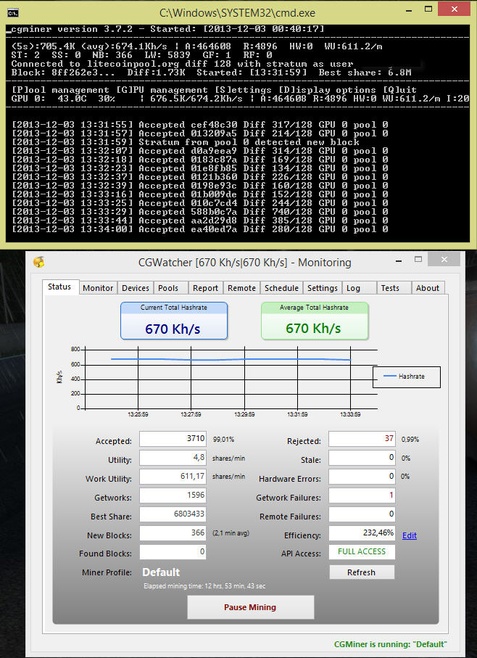
Mijn cgminer batch file (HD 7950)
code:
1
2
3
| setx GPU_MAX_ALLOC_PERCENT 100 setx GPU_USE_SYNC_OBJECTS 1 C:\Users\b\Downloads\cgminer-3.7.2-windows\cgminer-3.7.2-windows\cgminer.exe --scrypt -I 20 -g 1 --thread-concurrency 21712 -o stratum+tcp://litecoinpool.org:3333 -u xxx -p xxx |
HD7950@1150/1730@1.1V@+20%powerlimit
Win8.1 64bit | 13.11beta 9.2 | cgminer 3.7.2 | sdk 2.7
Na 12uurtjes ziet het er zo uit.
Configuratiehandleiding cgminer |
Scrypt mining, AKA litecoin mining, for GPU is completely different to sha256
used for bitcoin mining. The algorithm was originally developed in a manner
that it was anticipated would make it suitable for mining on CPU but NOT GPU.
Thanks to some innovative work by Artforz and mtrlt, this was proven to be
wrong. However, it has very different requirements to bitcoin mining and is a
lot more complicated to get working well. Note that it is a ram dependent
workload, and requires you to have enough system ram as well as fast enough
GPU ram. If you have less system ram than your GPU has, it may not be possible
to mine at any reasonable rate.
There are 5 main parameters to tuning scrypt, all of which are optional for
further fine tuning. When you start scrypt mining with the --scrypt option,
cgminer will fail IN RANDOM WAYS. They are all due to parameters being outside
what the GPU can cope with.
NOTE that if it does not fail at startup, the presence of hardware errors (HW)
are a sure sign that you have set the parameters too high.
DRIVERS AND OPENCL SDK
The choice of driver version for your GPU is critical, as some are known to
break scrypt mining entirely while others give poor hashrates. As for the
OpenCL SDK installed, for AMD it must be version 2.6 or later.
Step 1 on linux:
export GPU_MAX_ALLOC_PERCENT=100
If you do not do this, you may find it impossible to scrypt mine. You may find
a value of 40 is enough and increasing this further has little effect.
export GPU_USE_SYNC_OBJECTS=1
may help CPU usage a little as well.
On windows the same commands can be passed via a batch file if the following
lines are in the .bat before starting cgminer:
setx GPU_MAX_ALLOC_PERCENT 100
setx GPU_USE_SYNC_OBJECTS 1
--intensity XX (-I XX)
Just like in bitcoin mining, scrypt mining takes an intensity, however the
scale goes from 0 to 20 to mimic the "Aggression" used in mtrlt's reaper. The
reason this is crucial is that too high an intensity can actually be
disastrous with scrypt because it CAN run out of ram. High intensities
start writing over the same ram and it is highly dependent on the GPU, but they
can start actually DECREASING your hashrate, or even worse, start producing
garbage with HW errors skyrocketing. Note that if you do NOT specify an
intensity, cgminer uses dynamic mode which is designed to minimise the harm
to a running desktop and performance WILL be poor. The lower limit to intensity
with scrypt is usually 8 and cgminer will prevent it going too low.
SUMMARY: Setting this for reasonable hashrates is mandatory.
--shaders XXX
is a new option where you tell cgminer how many shaders your GPU has. This
helps cgminer try to choose some meaningful baseline parameters. Use this table
below to determine how many shaders your GPU has, and note that there are some
variants of these cards, and nvidia shaders are much much lower and virtually
pointless trying to mine on. If this is not set, cgminer will query the
device for how much memory it supports and will try to set a value based on
that.
SUMMARY: This will get you started but fine tuning for optimal performance is
required.
5000 Shaders Standaard TCC 5670 400 2000 5750 720 3600 5770 800 4000 5830 1120 5600 5850 1440 7200 5870 1600 8000 5970 2x1600 2x8000
6000 Shaders Standaard TCC 6450 160 640 6570 480 1920 6670 480 1920 6790 800 3200 6850 960 3840 6870 1120 4480 6950 1408 5632 6970 1536 6144 6990 2x1536 2x6144
7000 Shaders Standaard TCC 7750 512 2048 7770 640 2560 7790 896 3584 7850 1024 4096 7870 1280 5120 7870XT 1536 6144 7950 1792 7168 7970 2048 8192 7990 2x2048 2x8192
These are only used as a rough guide for cgminer, and it is rare that this is
all you will need to set.
Optional parameters to tune:
-g, --thread-concurrency, --lookup-gap
--thread-concurrency:
This tunes the optimal size of work that scrypt can do. It is internally tuned
by cgminer to be the highest reasonable multiple of shaders that it can
allocate on your GPU. Ideally it should be a multiple of your shader count.
vliw5 architecture (R5XXX) would be best at 5x shaders, while VLIW4 (R6xxx and
R7xxx) are best at 4x. Setting thread concurrency overrides anything you put
into --shaders and is ultimately a BETTER way to tune performance.
SUMMARY: Spend lots of time finding the highest value that your device likes
and increases hashrate.
-g:
Once you have found the optimal shaders and intensity, you can start increasing
the -g value till cgminer fails to start. This is really only of value if you
want to run low intensities as you will be unable to run more than 1.
SUMMARY: Don't touch this.
--lookup-gap
This tunes a compromise between ram usage and performance. Performance peaks
at a gap of 2, but increasing the gap can save you some GPU ram, but almost
always at the cost of significant loss of hashrate. Setting lookup gap
overrides the default of 2, but cgminer will use the --shaders value to choose
a thread-concurrency if you haven't chosen one.
SUMMARY: Don't touch this.
Related parameters:
--worksize XX (-w XX)
Has a minor effect, should be a multiple of 64 up to 256 maximum.
SUMMARY: Worth playing with once everything else has been tried but will
probably do nothing.
--vectors XX (-v XX)
Vectors are NOT used by the scrypt mining kernel.
SUMMARY: Does nothing.
Overclocking for scrypt mining:
First of all, do not underclock your memory initially. Scrypt mining requires
memory speed and on most, but not all, GPUs, lowering memory speed lowers
mining performance.
Second, absolute engine clock speeds do NOT correlate with hashrate. The ratio
of engine clock speed to memory matters, so if you set your memory to the
default value, and then start overclocking as you are running it, you should
find a sweet spot where the hashrate peaks and then it might actually drop if
you increase the engine clock speed further.
Third, the combination of motherboard, CPU and system ram ALSO makes a
difference, so values that work for a GPU on one system may not work for the
same GPU on a different system. A decent amount of system ram is actually
required for scrypt mining, and 4GB is suggested.
Finally, the power consumption while mining at high engine clocks, very high
memory clocks can be far in excess of what you might imagine.
For example, a 7970 running with the following settings:
--thread-concurrency 22392 --gpu-engine 1135 --gpu-memclock 1890
was using 305W!
---
TUNING AN AMD RADEON 7970
Example tuning a 7970 for Scrypt mining:
On linux run this command:
export GPU_MAX_ALLOC_PERCENT=100
or on windows this:
setx GPU_MAX_ALLOC_PERCENT 100
in the same console/bash/dos prompt/bat file/whatever you want to call it,
before running cgminer.
First, find the highest thread concurrency that you can start it at. They should
all start at 8192 but some will go up to 3 times that. Don't go too high on the
intensity while testing and don't change gpu threads. If you cannot go above
8192, don't fret as you can still get a high hashrate.
Delete any .bin files so you're starting from scratch and see what bins get
generated.
First try without any thread concurrency or even shaders, as cgminer will try to
find an optimal value
cgminer -I 13
If that starts mining, see what bin was generated, it is likely the largest
meaningful TC you can set.
Starting it on mine I get:
scrypt130302Tahitiglg2tc22392w64l8.bin
See tc22392 that's telling you what thread concurrency it was. It should start
without TC parameters, but you never know. So if it doesn't, start with
--thread-concurrency 8192 and add 2048 to it at a time till you find the highest
value it will start successfully at.
Then start overclocking the eyeballs off your memory, as 7970s are exquisitely
sensitive to memory speed and amazingly overclockable but please make sure it
keeps adequately cooled with --auto-fan! Do it while it's running from the GPU
menu. Go up by 25 at a time every 30 seconds or so until your GPU crashes. Then
reboot and start it 25 lower as a rough start. Mine runs stable at 1900 memory
without overvolting. Overvolting is the only thing that can actually damage your
GPU so I wouldn't recommend it at all.
Then once you find the maximum memory clock speed, you need to find the sweet
spot engine clock speed that matches it. It's a fine line where one more MHz
will make the hashrate drop by 20%. It's somewhere in the .57 - 0.6 ratio range.
Start your engine clock speed at half your memory clock speed and then increase
it by 5 at a time. The hashrate should climb a little each rise in engine speed
and then suddenly drop above a certain value. Decrease it by 1 then until you
find it climbs dramatically. If your engine clock speed cannot get that high
without crashing the GPU, you will have to use a lower memclock.
Then, and only then, bother trying to increase intensity further.
My final settings were:
--gpu-engine 1141 --gpu-memclock 1875 -I 20
for a hashrate of 745kH.
Note I did not bother setting a thread concurrency. Once you have the magic
endpoint, look at what tc was chosen by the bin file generated and then hard
code that in next time (eg --thread-concurrency 22392) as slight changes in
thread concurrency will happen every time if you don't specify one, and the tc
to clock ratios are critical!
Good luck, and if this doesn't work for you, well same old magic discussion
applies, I cannot debug every hardware combo out there.
Your numbers will be your numbers depending on your hardware combination and OS,
so don't expect to get exactly the same results!
https://raw.github.com/ckolivas/cgminer/v3.7.2/SCRYPT-README
Coins omzetten naar Euro's op je rekening |
Na een tijdje gemined te hebben is het eindelijk zo ver je wilt euro's cashen

Vanuit je mining pool kan je het storten naar je wallet of direct naar een exchange account
bijv. https://btc-e.com https://bter.com https://cryptsy.com
Hier zet je het om in Bitcoin wel even goed naar de koers kijken dat je het zo voordelig mogelijk exchange. Deze bitcoin(s) stuur je naar je Bitcoin wallet eenmaal ontvangen gaan we naar Bitonic, Kraken, Bitstamp deze heren nemen graag je bitcoin(s) over tegen keiharde euro's die je na het versturen van je bitcoin(s) op je bankrekening krijgt. Meer info Cryptocurrency - handel en koers
User configs |
| Gpu | Mem | scrypt | Clocks (GPU/Mem) | UV | Hash (Kh/s) | WU/m | Miner config | OS | Temp | User |
| Gigabyte R9 280x GV-R928XOC-3GD | Elpida | scrypt-vert | 980/1500 | 1.000v (UV dmv Bios flash) | 330 | 310 | -I 13 -g 2 -v 1 -w 256 --lookup-gap 2 --thread-concurrency 8193 --gpu-engine 980 --vdcc 1.000 | Windows 8.1 | 75C @ 1800rpm | Rayures |
| Gigabyte R9 280x GV-R928XOC-3GD | Elpida | scrypt | 1055/1500 | 1.050v (UV dmv Bios flash) | 740 | 710 | -I 13 -g 2 -v 1 -w 256 --lookup-gap 2 --thread-concurrency 8192 --gpu-engine 1055 --vdcc 1.050 | Windows 8.1 | 75C @ 1800rpm | Rayures |
| Club3d R9 280x RoyalQueen | ? | scrypt | 1030/1500 | 1.100v (UV standaard mogelijk) | 715 | 690 | -I 13 -g 2 -w 256 --thread-concurrency 8192 | Windows 7 | 72C @ 3100rpm | eMiz0r |
| Gpu | Mem | scrypt | Clocks (GPU/Mem) | UV | Hash (Kh/s) | WU/m | Miner config | OS | Temp | User |
| MSI 7970 Lightning Boost | Hynix | scrypt-vert | 1050/1500 | 1.119v Primair, 1.097v Secundair | 365 Primair, 380 Secundair | Dit hoort hier niet. | -I 13 -g 2 -w 256 --lookup-gap 2 --thread-concurrency 8192 | Windows 8.1 | 64c @ 1200 RPM | Thomg |
| Club3d R9 280x RoyalQueen | Elpida | scrypt-vert | 1010/1500 | 1.050v Primair, 1.032v Secundair | 295 Primair, 360 Secundair | - | -I 13 -g 2 -w 256 --thread-concurrency 8192 | Windows 8.1 | 65-70c 1700-2500 RPM | Thomg |
| Gpu | Mem | scrypt | Clocks (GPU/Mem) | UV | Hash (Kh/s) | WU/m | Miner config | OS | Temp | User |
| MSI 7970 Lightning Boost | Hynix | scrypt | 1080/1500 | 1.138v Primair, 1.112v Secundair | 755 Primair, 765 Secundair | Dit hoort hier niet. | -I 13 -g 2 -w 256 --lookup-gap 2 --thread-concurrency 8192 | Windows 8.1 | 66c @ 1400 RPM | Thomg |
| Club3d R9 280x RoyalQueen | Elpida | scrypt | 1050/1500 | 1.080v Primair, 1.069v Secundair | 600-700 Primair, 740 Secundair | - | -I 13 -g 2 -w 256 --thread-concurrency 8192 | Windows 8.1 | 66-72c 1900-2800 RPM | Thomg |
OC-tools gpu |
HIS iTurbo
Overclocksoftware voor Club3d kaarten
MSI Afterburner
Tweakers hashrates |
Tweakers hashoverzicht
Info van tweakers hasrates/gpus/batchfiles etc..
Sta je er nog niet in? Invullen graag
Best-buy-Scrypt-rig |
1000 euro ~1920kh/s (6x320kh/s) Verbruik ~37W per gpu??
(onder voorbehoud)
(onder voorbehoud)
| # | Product | Prijs | Subtotaal |
| 1 | Intel Celeron G1820 Boxed | € 30,44 | € 30,44 |
| 1 | ASRock H81 Pro BTC | € 52,04 | € 52,04 |
| 6 | MSI GeForce GTX 750Ti | € 129,- | € 774,- |
| 1 | Corsair CMV4GX3M2A1333C9 | € 40,- | € 40,- |
| 1 | Seasonic G-Serie 450Watt | € 65,99 | € 65,99 |
| 1 | Sandisk ReadyCache Solid State Drive 32GB | € 35,06 | € 35,06 |
| Bekijk collectie Importeer producten | Totaal | € 997,53 | |
1100 euro ~2220kh/s (3*740kh/s) verbruik ~250W per gpu
| # | Product | Prijs | Subtotaal |
| 1 | Intel Celeron G1820 Boxed | € 30,44 | € 30,44 |
| 1 | ASRock H81 Pro BTC | € 52,04 | € 52,04 |
| 3 | Club3D Radeon R9 280X royalQueen | € 260,50 | € 781,50 |
| 1 | Crucial CT51264BA160BJ | € 30,- | € 30,- |
| 1 | Cooler Master V Series V1000 | € 165,- | € 165,- |
| 1 | Sandisk ReadyCache Solid State Drive 32GB | € 35,06 | € 35,06 |
| Bekijk collectie Importeer producten | Totaal | € 1.094,04 | |
1600 euro ~3900kh/s (6x650kh/s) Verbruik ~200W per gpu
| # | Product | Prijs | Subtotaal |
| 1 | Intel Celeron G1820 Boxed | € 30,44 | € 30,44 |
| 1 | ASRock H81 Pro BTC | € 53,- | € 53,- |
| 6 | XFX Radeon HD7950 Double Dissipation Edition | € 199,90 | € 1.199,40 |
| 1 | Corsair CMV4GX3M2A1333C9 | € 39,64 | € 39,64 |
| 2 | Corsair RM850 | € 124,50 | € 249,- |
| 1 | Sandisk ReadyCache Solid State Drive 32GB | € 35,06 | € 35,06 |
| Bekijk collectie Importeer producten | Totaal | € 1.606,54 | |
2000 euro ~4440kh/s (6*740kh/s) Verbruik ~250W per gpu
| # | Product | Prijs | Subtotaal |
| 1 | Intel Celeron G1820 Boxed | € 30,44 | € 30,44 |
| 1 | ASRock H81 Pro BTC | € 53,- | € 53,- |
| 6 | Club3D Radeon R9 280X royalQueen | € 261,- | € 1.566,- |
| 1 | Crucial CT51264BA160BJ | € 30,- | € 30,- |
| 2 | Corsair AX860 | € 154,- | € 308,- |
| 1 | Sandisk ReadyCache Solid State Drive 32GB | € 35,06 | € 35,06 |
| Bekijk collectie Importeer producten | Totaal | € 2.022,50 | |
*exclusief risers en behuizing evt SSD vervangen voor USB-stick mocht je BAMT/SMOS willen draaien.
Mocht je nog tips/ideeen hebben voor de TS, DM me dan.
[ Voor 255% gewijzigd door Bullus op 22-08-2017 06:25 ]
|2600k|Asus 290|
:strip_exif()/u/193218/crop5935d28c1e50b_cropped.gif?f=community)
:strip_icc():strip_exif()/u/24109/tweakers_avatar.jpg?f=community)

