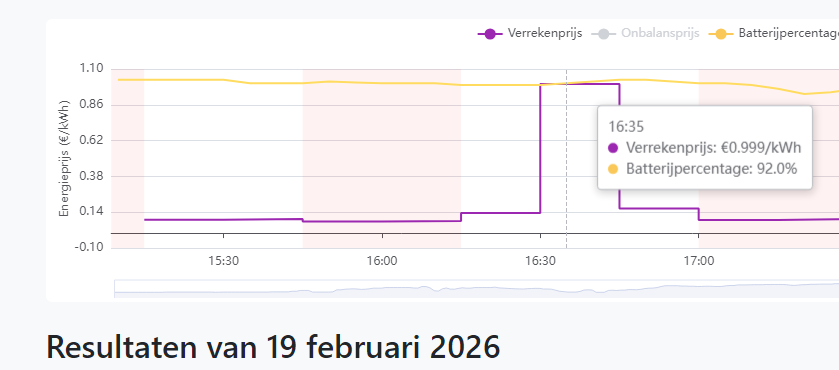
Wellicht dat er mensen zijn die geïnteresseerd zijn in hoe ik ben gekomen tot mijn setup om bij (negatieve) onbalansprijzen enige mate van sturing toe te passen. Hieronder vind je een kort stappenplan voor Home Assistant-gebruikers.
- Onbalans prijzen ophalen
- Aanmaken helpers
- Maak een automation voor het aan en - uit zetten
- Maak een dashboard zodat je een en ander in kan stellen / inzien
Stap 1: onbalans prijzen ophalen
De onbalansprijzen zijn op verschillende manieren op te halen. Zelf gebruik ik:
https://services.tenergy....spx/actualimbalanceprices in combinatie met het script van @paq, dat ik iets heb aangepast. Deze code doet één call voor zowel de sell als de buy price. Voeg de onderstaande code toe aan je configuration.yaml.
code:
1
2
3
4
5
6
7
8
9
10
11
12
13
| # This section handles the actual "fetching" of the data
command_line:
- sensor:
name: "Tennet Imbalance Prices"
unique_id: tennet_prices_master
command: >
curl -s 'https://services.tenergy.nl/public.aspx/actualimbalanceprices' | python3 -c "import sys,re,html,json; h=sys.stdin.read(); m=re.search(r'(<table[^>]*>.*?Feed.*?Take.*?</table>)', h, flags=re.S|re.I); t=m.group(1) if m else h; clean=lambda s: re.sub(r'\s+',' ',re.sub(r'<[^>]+>',' ',html.unescape(s))).strip(); rows=re.findall(r'<tr[^>]*>.*?</tr>', t, flags=re.S|re.I); num=r'-?\d+(?:[\.,]\d+)?'; data=[[clean(c) for c in re.findall(r'<t[dh][^>]*>(.*?)</t[dh]>', r, flags=re.S|re.I)] for r in rows]; row=next((r for r in data if len(r)>=3 and re.fullmatch(num, r[-1])), None); print(json.dumps({'sell': row[-2].replace(',','.'), 'buy': row[-1].replace(',','.')}) if row else '{}')"
scan_interval: 60
value_template: "{{ value_json.buy if value_json.buy is defined else 'unavailable' }}"
unit_of_measurement: "EUR/MWh"
json_attributes:
- sell
- buy |
En bij de sensors de sensors
code:
1
2
3
4
5
6
7
8
9
10
11
| # This section creates the "Buy" and "Sell" entities for your ApexCharts
- sensor:
- name: "Tennet Onbalans Prijs koop buy"
unique_id: onbalans_prijs_buy_final
unit_of_measurement: "EUR/MWh"
state: "{{ states('sensor.tennet_imbalance_prices') }}"
- name: "Tennet Onbalans Prijs verkoop sell"
unique_id: onbalans_prijs_sell_final
unit_of_measurement: "EUR/MWh"
state: "{{ state_attr('sensor.tennet_imbalance_prices', 'sell') }}" |
Na het toevoegen heb ik Home Assistant opnieuw opgestart.
Stap 2 aanmaken helpers
Navigeer naar Settings → Devices & Services → Helpers. Ik gebruik drie helpers:
- enable_manual_stop_production , boolean input “waarop ik in de scripts kan filteren
- productie_limiet_percentage_soc , number input, min value 50, max value 100
- production_stop_sell_price: number input tussen de -150 en 200; om het makkelijk f te houden is dit dezelfde prijs als op tenenergy wordt gepubliceerd, oftewel voor 6 cent hou ik 60 (EUR/Mwh) aan. Bij advanced setting kun je de step size op 1 zetten en de Unit of measurement op EUR/MWh
Stap 3 maak een automation voor het aan en - uit zetten
Voor het uitschakelen van de export van de Deye (en eventueel andere omvormers) gebruik ik onderstaande automation. De switch production is van Enphase, maar deze kun je vervangen door je eigen SolarEdge/GoodWe/etc. De check op de onbalansprijs bij het starten van de automation is voor nu bewust uitgezet, omdat ik ook als de SoC lager wordt de boel weer wil aanslingeren

/f/image/agZjsJkDg6nxBuaft7YMZ3AI.png?f=fotoalbum_large)
code:
1
2
3
4
5
6
7
8
9
10
11
12
13
14
15
16
17
18
19
20
21
22
23
24
25
26
27
28
29
30
31
32
| alias: "Stop productie indien sell price te laag "
description: ""
triggers:
- trigger: numeric_state
entity_id:
- sensor.deye_12k_battery
above: input_number.productie_limiet_percentage_soc
- trigger: numeric_state
entity_id:
- sensor.tennet_onbalans_prijs_verkoop_sell
below: input_number.production_stop_sell_price
conditions:
- condition: numeric_state
entity_id: sensor.deye_12k_battery
above: input_number.productie_limiet_percentage_soc
enabled: true
- condition: numeric_state
entity_id: sensor.tennet_onbalans_prijs_verkoop_sell
below: input_number.production_stop_sell_price
- condition: state
entity_id: input_boolean.enable_manual_stop_production
state:
- "on"
actions:
- action: switch.turn_off
metadata: {}
target:
entity_id:
- switch.deye_12k_export_surplus
- switch.production
data: {}
mode: single |
Daarna volgt nog een automation om het geheel weer in te schakelen zodra de prijzen boven de ingestelde drempel komen.
code:
1
2
3
4
5
6
7
8
9
10
11
12
13
14
15
16
17
18
19
20
21
22
23
24
25
26
27
28
29
30
31
32
33
34
| alias: Start production below x% and if sell price > limiet
description: ""
triggers:
- trigger: numeric_state
entity_id:
- sensor.deye_12k_battery
below: input_number.productie_limiet_percentage_soc
enabled: true
- trigger: numeric_state
entity_id:
- sensor.tennet_onbalans_prijs_verkoop_sell
above: input_number.production_stop_sell_price
conditions:
- condition: numeric_state
entity_id: sensor.tennet_onbalans_prijs_verkoop_sell
above: input_number.production_stop_sell_price
enabled: false
- condition: state
entity_id: input_boolean.enable_manual_stop_production
state:
- "on"
- condition: state
entity_id: switch.deye_12k_export_surplus
state:
- "off"
actions:
- action: switch.turn_on
metadata: {}
target:
entity_id:
- switch.deye_12k_export_surplus
- switch.production
data: {}
mode: single |
Stap 4 dashboard
Ik heb een dashboard gemaakt waarin ik instellingen kan aanpassen en de onbalansprijzen visueel kan volgen.
/f/image/WqHf7W1OUR9YLVZp50LgbudA.png?f=fotoalbum_large)
Download eerst ApexCharts:
https://github.com/RomRid...tab=readme-ov-file#readme
Voeg daarna een nieuwe ApexCharts-kaart toe aan je dashboard en gebruik de onderstaande configuratie. Zelf heb ik ook een variant met graph_span: 60m voor de laatste 60 minuten.
code:
1
2
3
4
5
6
7
8
9
10
11
12
13
14
15
16
17
18
19
20
21
22
23
24
25
26
27
28
29
30
31
32
33
34
35
36
37
| type: custom:apexcharts-card
type: custom:apexcharts-card
header:
show: true
title: TenEnergy Imbalance (Today)
show_states: true
colorize_states: true
graph_span: 1d
span:
start: day
now:
show: true
label: Now
series:
- entity: sensor.tennet_onbalans_prijs_koop_buy
name: Buy Price
type: line
color: "#e74c3c"
stroke_width: 1
group_by:
func: last
duration: 1m
- entity: sensor.tennet_onbalans_prijs_verkoop_sell
name: Sell Price
type: line
color: "#2ecc71"
stroke_width: 1
group_by:
func: last
duration: 1m
- entity: input_number.production_stop_sell_price
stroke_width: 1
color: "#f1c40f"
show:
in_chart: true
in_header: true
legend_value: true |
Daarnaast heb ik nog een kaart met entities toegevoegd om eenvoudig instellingen te kunnen wijzigen. Via een slider kun je de automation aan/uit zetten, de verkoopprijs instellen (in dit voorbeeld 0) en de SOC-limiet bepalen. Bij mij staat deze op 93%; als je alleen Deye gebruikt, zou 95% logischer zijn.
code:
1
2
3
4
5
6
7
8
9
10
11
12
13
14
15
| type: grid
cards:
- type: heading
heading: Zonnepanelen uitschakelen
heading_style: subtitle
- type: entities
entities:
- entity: sensor.deye_12k_battery
- entity: sensor.tennet_onbalans_prijs_verkoop_sell
- entity: input_boolean.enable_manual_stop_production
- entity: switch.production
name: Production Enphase
- entity: switch.deye_12k_export_surplus
- entity: input_number.production_stop_sell_price
- entity: input_number.productie_limiet_percentage_soc |
Ik heb gisteren nog wat kleine aanpassingen doorgevoerd die ik nog niet volledig kon testen. Mochten er problemen optreden, laat het gerust weten.


:strip_exif()/u/33665/GTicon.gif?f=community)
:strip_icc():strip_exif()/u/59664/crop63e2bd9de7d58_cropped.jpg?f=community)

:strip_exif()/f/image/agZjsJkDg6nxBuaft7YMZ3AI.png?f=user_large)
:strip_exif()/f/image/WqHf7W1OUR9YLVZp50LgbudA.png?f=user_large)
:strip_icc():strip_exif()/u/823483/crop583d46e78169a_cropped.jpeg?f=community)
/u/1160866/crop69523f4e5830a_cropped.png?f=community)
/u/1436460/crop5f326eba3de0d_cropped.png?f=community)
:strip_icc():strip_exif()/u/5924/crop6977968981f50_cropped.jpg?f=community)
:strip_icc():strip_exif()/u/8511/ronald_avatar.jpg?f=community)
 .
./u/1954532/crop69b26bf25ba76_cropped.png?f=community)
:strip_icc():strip_exif()/u/284568/crop5f8d3fa8c696a_cropped.jpeg?f=community)


:strip_exif()/u/7018/goticon.gif?f=community)

:gifsicle():strip_exif()/f/image/GnLiRSL8eTIAYbUpWPlJrHvV.gif?f=user_large)

:strip_exif()/f/image/xC0UevXTAzyYwhPqmSGHB9GN.png?f=user_large)


:strip_exif()/f/image/TCFc6TTo95jQfbXfyWeEaqZE.png?f=user_large)

:strip_icc():strip_exif()/u/2321092/crop6a0ed9b0c5465_cropped.jpg?f=community)
:strip_icc():strip_exif()/u/50867/k750logo1.jpg?f=community)
 ) pas beginnen als het handelen ook gaat beginnen.
:no_upscale():strip_icc():strip_exif()/f/image/gcl9abv9ELJgo5M2jx9zID46.jpg?f=user_large)
:no_upscale():strip_icc():strip_exif()/f/image/1MvCzMcdh2VxSp8tFI5TUPXD.jpg?f=user_large)
:no_upscale():strip_icc():strip_exif()/f/image/0fDnnn60qobphG7MuFvNSsav.jpg?f=user_large)
:no_upscale():strip_icc():strip_exif()/f/image/PC30MHpKw3pTxMFR4JJVWOjV.jpg?f=user_large)
:no_upscale():strip_icc():strip_exif()/f/image/eQ6aYFpKLWxNZCh5Tv0vMTKF.jpg?f=user_large)
:no_upscale():strip_icc():strip_exif()/f/image/Ylr842MYzPpWC6AnhYV5HKY0.jpg?f=user_large)
:no_upscale():strip_icc():strip_exif()/f/image/ZPFOrayb5hDjTrcNRGv2JJE4.jpg?f=user_large)
:no_upscale():strip_icc():strip_exif()/f/image/6HteqAfyN7oAFbWVqwnBwAyo.jpg?f=user_large)
:no_upscale():strip_icc():strip_exif()/f/image/ykTeXZAFri05KnwxLfP4bcr9.jpg?f=user_large)
:no_upscale():strip_icc():strip_exif()/f/image/2pOF2PXgzm5JrGoANanFdl10.jpg?f=user_large)
:no_upscale():strip_icc():strip_exif()/f/image/YBxgMGcgsHWU1T8A0Epz7Sx7.jpg?f=user_large)

:strip_exif()/f/image/fqeoIGnY5I4AvvIiEZa3dGKo.png?f=user_large)


 Dit topic is gesloten.