

My Youtube channel: Alfa Novanta
AMD Ryzen 7 5800X | ASRock X470 Taichi | 32GB Kingston HyperX Predator DDR4-3200 RGB | Gigabyte RTX3090 Gaming OC 24GB GDDR6 | Windows 10 x64 | HP Reverb G2
- Alfa Novanta
- Registratie: Oktober 2001
- Laatst online: 01-10 10:27
:strip_exif()/u/37472/90-2.gif?f=community)
/u/61403/crop58bff192a74cb_cropped.png?f=community)
- Alfa Novanta
- Registratie: Oktober 2001
- Laatst online: 01-10 10:27
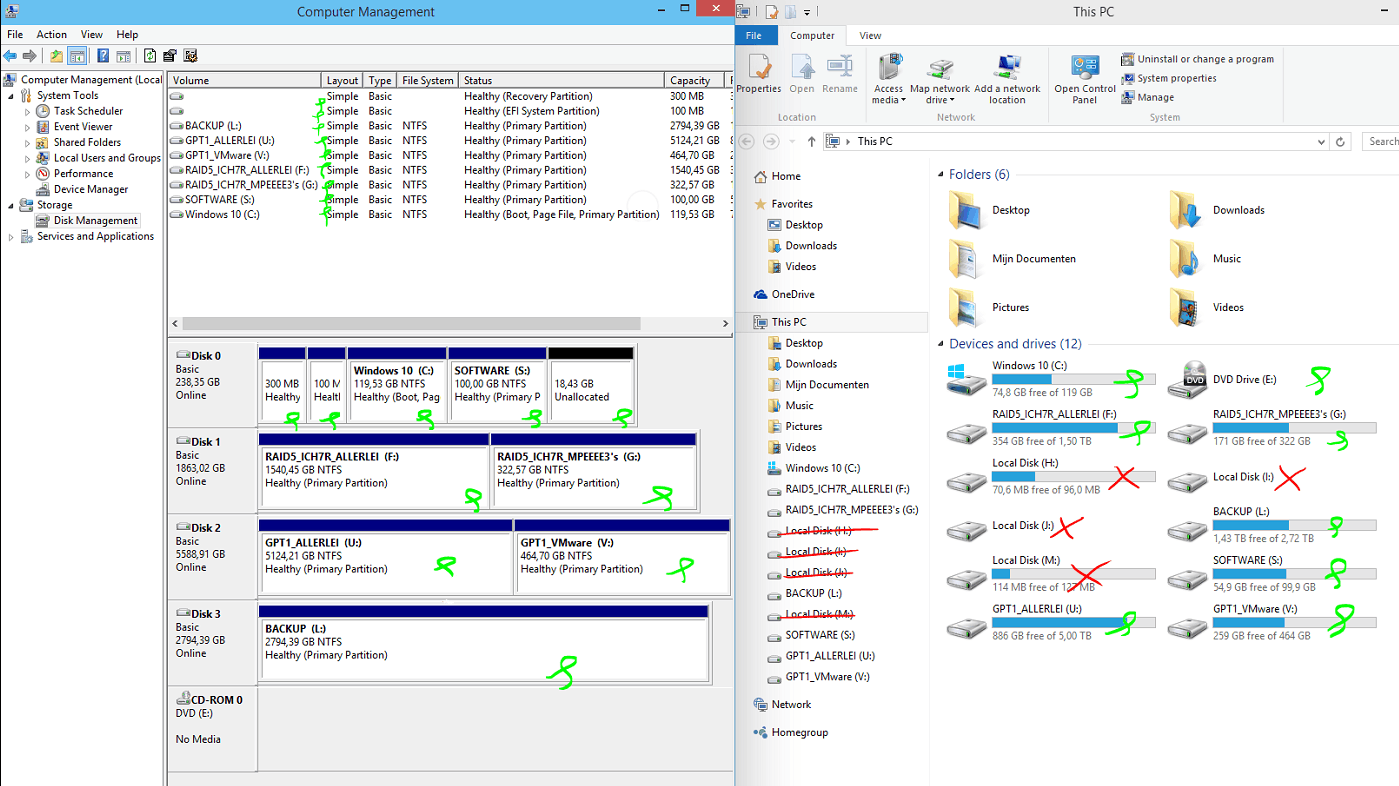
Zie jij die rooie kruisjes rechts ook onder disk management links? Ik niet

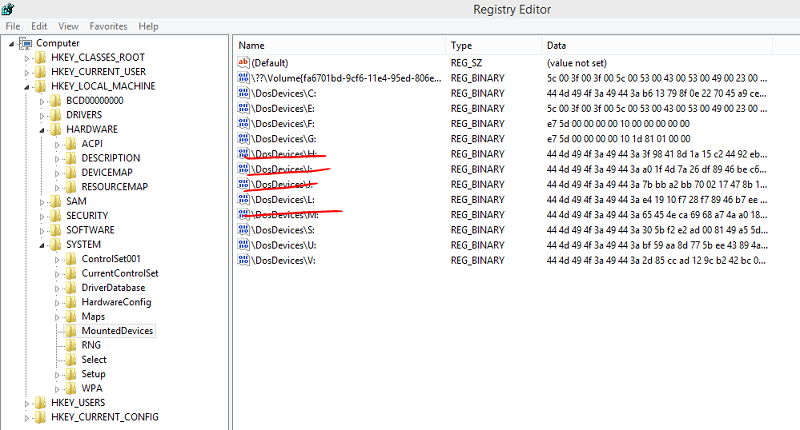
owjah, ik heb nog wat gedaan .. behalve de SSD alle andere disks losgekoppeld maar naast de C: en S: blijven de phantom disks gewoon staan .. ze krijgen hooguit een andere driveletter
owjah, ik heb nog wat gedaan .. behalve de SSD alle andere disks losgekoppeld maar naast de C: en S: blijven de phantom disks gewoon staan .. ze krijgen hooguit een andere driveletter
[ Voor 60% gewijzigd door Alfa Novanta op 23-01-2015 22:44 ]
My Youtube channel: Alfa Novanta
AMD Ryzen 7 5800X | ASRock X470 Taichi | 32GB Kingston HyperX Predator DDR4-3200 RGB | Gigabyte RTX3090 Gaming OC 24GB GDDR6 | Windows 10 x64 | HP Reverb G2
- Alfa Novanta
- Registratie: Oktober 2001
- Laatst online: 01-10 10:27
Ik ben toch nog iets verder gekomen ..
Chkdsk H: /V geeft het volgende weer
dus je zou denken dat dit op mijn Windows disk de automatisch aangemaakte 100 MB partitie is. Maar waar komt de driveletter H vandaan en hoe krijg ik die er vanaf?
fixed
H: is foetsie
code:
1
2
3
4
| Chkdsk /?
/V On FAT/FAT32: Displays the full path and name of every
file on the disk. |
Chkdsk H: /V geeft het volgende weer
code:
1
2
3
4
5
6
7
8
9
10
11
12
13
14
15
16
17
18
19
20
21
22
23
24
25
26
27
28
29
30
31
32
33
34
35
36
37
38
39
40
41
42
43
44
45
46
47
48
49
50
51
52
53
54
55
56
57
58
59
60
61
62
63
64
65
66
67
68
69
70
71
72
73
74
75
76
77
78
79
80
81
82
83
84
85
86
87
88
89
90
91
92
93
94
95
96
97
98
99
100
101
102
103
104
105
106
107
108
109
110
111
112
113
114
115
116
117
118
119
120
121
122
123
124
125
126
127
128
129
130
131
132
133
134
135
136
137
138
139
140
141
142
143
144
145
146
147
148
149
150
151
152
153
154
155
156
157
158
159
160
161
162
163
164
165
166
167
168
169
170
171
172
173
174
175
176
177
178
179
180
181
182
183
184
185
186
187
188
189
190
191
192
193
194
195
196
197
198
199
200
201
202
203
204
205
206
207
208
209
210
211
212
213
214
215
216
217
218
219
220
221
222
223
224
225
226
227
228
229
230
231
232
233
234
235
236
237
238
239
240
241
242
243
244
245
246
247
248
249
250
251
252
253
254
255
256
257
258
259
260
261
262
263
264
265
266
267
268
| The type of the file system is FAT32.
Volume Serial Number is 7450-05BA
Windows is verifying files and folders...
0 percent completed.
\EFI
\System Volume Information
\$RECYCLE.BIN
\$RECYCLE.BIN\desktop.ini
\System Volume Information\IndexerVolumeGuid
\EFI\Microsoft
\EFI\Boot
\EFI\Boot\bootx64.efi
6 percent completed.
\EFI\Microsoft\Boot
\EFI\Microsoft\Boot\BCD
\EFI\Microsoft\Boot\BCD.LOG
\EFI\Microsoft\Boot\bg-BG
\EFI\Microsoft\Boot\boot.stl
\EFI\Microsoft\Boot\bootmgfw.efi
12 percent completed.
\EFI\Microsoft\Boot\bootmgr.efi
18 percent completed.
\EFI\Microsoft\Boot\cs-CZ
\EFI\Microsoft\Boot\da-DK
\EFI\Microsoft\Boot\de-DE
\EFI\Microsoft\Boot\el-GR
\EFI\Microsoft\Boot\en-GB
\EFI\Microsoft\Boot\en-US
\EFI\Microsoft\Boot\es-ES
\EFI\Microsoft\Boot\et-EE
\EFI\Microsoft\Boot\fi-FI
\EFI\Microsoft\Boot\fr-FR
\EFI\Microsoft\Boot\hr-HR
\EFI\Microsoft\Boot\hu-HU
\EFI\Microsoft\Boot\it-IT
\EFI\Microsoft\Boot\ja-JP
\EFI\Microsoft\Boot\ko-KR
\EFI\Microsoft\Boot\lt-LT
\EFI\Microsoft\Boot\lv-LV
\EFI\Microsoft\Boot\memtest.efi
24 percent completed.
\EFI\Microsoft\Boot\nb-NO
\EFI\Microsoft\Boot\nl-NL
\EFI\Microsoft\Boot\pl-PL
\EFI\Microsoft\Boot\pt-BR
\EFI\Microsoft\Boot\pt-PT
\EFI\Microsoft\Boot\qps-ploc
\EFI\Microsoft\Boot\ro-RO
\EFI\Microsoft\Boot\ru-RU
\EFI\Microsoft\Boot\sk-SK
\EFI\Microsoft\Boot\sl-SI
\EFI\Microsoft\Boot\sr-Latn-CS
\EFI\Microsoft\Boot\sr-Latn-RS
\EFI\Microsoft\Boot\sv-SE
\EFI\Microsoft\Boot\tr-TR
\EFI\Microsoft\Boot\uk-UA
\EFI\Microsoft\Boot\zh-CN
\EFI\Microsoft\Boot\zh-HK
\EFI\Microsoft\Boot\zh-TW
\EFI\Microsoft\Boot\BOOTSTAT.DAT
25 percent completed.
\EFI\Microsoft\Boot\Fonts
\EFI\Microsoft\Boot\Resources
\EFI\Microsoft\Boot\BCD.LOG1
\EFI\Microsoft\Boot\BCD.LOG2
\EFI\Microsoft\Boot\Resources\bootres.dll
\EFI\Microsoft\Boot\Resources\en-US
\EFI\Microsoft\Boot\Resources\en-US\bootres.dll.mui
\EFI\Microsoft\Boot\Fonts\chs_boot.ttf
39 percent completed.
\EFI\Microsoft\Boot\Fonts\cht_boot.ttf
53 percent completed.
\EFI\Microsoft\Boot\Fonts\jpn_boot.ttf
61 percent completed.
\EFI\Microsoft\Boot\Fonts\kor_boot.ttf
70 percent completed.
\EFI\Microsoft\Boot\Fonts\malgunn_boot.ttf
\EFI\Microsoft\Boot\Fonts\malgun_boot.ttf
71 percent completed.
\EFI\Microsoft\Boot\Fonts\meiryon_boot.ttf
\EFI\Microsoft\Boot\Fonts\meiryo_boot.ttf
72 percent completed.
\EFI\Microsoft\Boot\Fonts\msjhn_boot.ttf
\EFI\Microsoft\Boot\Fonts\msjh_boot.ttf
73 percent completed.
\EFI\Microsoft\Boot\Fonts\msyhn_boot.ttf
74 percent completed.
\EFI\Microsoft\Boot\Fonts\msyh_boot.ttf
\EFI\Microsoft\Boot\Fonts\segmono_boot.ttf
\EFI\Microsoft\Boot\Fonts\segoen_slboot.ttf
75 percent completed.
\EFI\Microsoft\Boot\Fonts\segoe_slboot.ttf
\EFI\Microsoft\Boot\Fonts\wgl4_boot.ttf
\EFI\Microsoft\Boot\zh-TW\bootmgfw.efi.mui
\EFI\Microsoft\Boot\zh-TW\bootmgr.efi.mui
\EFI\Microsoft\Boot\zh-TW\memtest.efi.mui
76 percent completed.
\EFI\Microsoft\Boot\zh-HK\bootmgfw.efi.mui
\EFI\Microsoft\Boot\zh-HK\bootmgr.efi.mui
\EFI\Microsoft\Boot\zh-HK\memtest.efi.mui
\EFI\Microsoft\Boot\zh-CN\bootmgfw.efi.mui
77 percent completed.
\EFI\Microsoft\Boot\zh-CN\bootmgr.efi.mui
\EFI\Microsoft\Boot\zh-CN\memtest.efi.mui
\EFI\Microsoft\Boot\uk-UA\bootmgfw.efi.mui
\EFI\Microsoft\Boot\uk-UA\bootmgr.efi.mui
78 percent completed.
\EFI\Microsoft\Boot\tr-TR\bootmgfw.efi.mui
\EFI\Microsoft\Boot\tr-TR\bootmgr.efi.mui
\EFI\Microsoft\Boot\tr-TR\memtest.efi.mui
\EFI\Microsoft\Boot\sv-SE\bootmgfw.efi.mui
79 percent completed.
\EFI\Microsoft\Boot\sv-SE\bootmgr.efi.mui
\EFI\Microsoft\Boot\sv-SE\memtest.efi.mui
\EFI\Microsoft\Boot\sr-Latn-RS\bootmgfw.efi.mui
\EFI\Microsoft\Boot\sr-Latn-RS\bootmgr.efi.mui
80 percent completed.
\EFI\Microsoft\Boot\sr-Latn-CS\bootmgfw.efi.mui
\EFI\Microsoft\Boot\sr-Latn-CS\bootmgr.efi.mui
\EFI\Microsoft\Boot\sl-SI\bootmgfw.efi.mui
\EFI\Microsoft\Boot\sl-SI\bootmgr.efi.mui
81 percent completed.
\EFI\Microsoft\Boot\sk-SK\bootmgfw.efi.mui
\EFI\Microsoft\Boot\sk-SK\bootmgr.efi.mui
\EFI\Microsoft\Boot\ru-RU\bootmgfw.efi.mui
82 percent completed.
\EFI\Microsoft\Boot\ru-RU\bootmgr.efi.mui
\EFI\Microsoft\Boot\ru-RU\memtest.efi.mui
\EFI\Microsoft\Boot\ro-RO\bootmgfw.efi.mui
\EFI\Microsoft\Boot\ro-RO\bootmgr.efi.mui
83 percent completed.
\EFI\Microsoft\Boot\qps-ploc\bootmgfw.efi.mui
\EFI\Microsoft\Boot\qps-ploc\bootmgr.efi.mui
\EFI\Microsoft\Boot\qps-ploc\memtest.efi.mui
\EFI\Microsoft\Boot\pt-PT\bootmgfw.efi.mui
84 percent completed.
\EFI\Microsoft\Boot\pt-PT\bootmgr.efi.mui
\EFI\Microsoft\Boot\pt-PT\memtest.efi.mui
\EFI\Microsoft\Boot\pt-BR\bootmgfw.efi.mui
\EFI\Microsoft\Boot\pt-BR\bootmgr.efi.mui
85 percent completed.
\EFI\Microsoft\Boot\pt-BR\memtest.efi.mui
\EFI\Microsoft\Boot\pl-PL\bootmgfw.efi.mui
\EFI\Microsoft\Boot\pl-PL\bootmgr.efi.mui
\EFI\Microsoft\Boot\pl-PL\memtest.efi.mui
86 percent completed.
\EFI\Microsoft\Boot\nl-NL\bootmgfw.efi.mui
\EFI\Microsoft\Boot\nl-NL\bootmgr.efi.mui
\EFI\Microsoft\Boot\nl-NL\memtest.efi.mui
\EFI\Microsoft\Boot\nb-NO\bootmgfw.efi.mui
87 percent completed.
\EFI\Microsoft\Boot\nb-NO\bootmgr.efi.mui
\EFI\Microsoft\Boot\nb-NO\memtest.efi.mui
\EFI\Microsoft\Boot\lv-LV\bootmgfw.efi.mui
\EFI\Microsoft\Boot\lv-LV\bootmgr.efi.mui
88 percent completed.
\EFI\Microsoft\Boot\lt-LT\bootmgfw.efi.mui
\EFI\Microsoft\Boot\lt-LT\bootmgr.efi.mui
\EFI\Microsoft\Boot\ko-KR\bootmgfw.efi.mui
89 percent completed.
\EFI\Microsoft\Boot\ko-KR\bootmgr.efi.mui
\EFI\Microsoft\Boot\ko-KR\memtest.efi.mui
\EFI\Microsoft\Boot\ja-JP\bootmgfw.efi.mui
\EFI\Microsoft\Boot\ja-JP\bootmgr.efi.mui
\EFI\Microsoft\Boot\ja-JP\memtest.efi.mui
90 percent completed.
\EFI\Microsoft\Boot\it-IT\bootmgfw.efi.mui
\EFI\Microsoft\Boot\it-IT\bootmgr.efi.mui
\EFI\Microsoft\Boot\it-IT\memtest.efi.mui
\EFI\Microsoft\Boot\hu-HU\bootmgfw.efi.mui
91 percent completed.
\EFI\Microsoft\Boot\hu-HU\bootmgr.efi.mui
\EFI\Microsoft\Boot\hu-HU\memtest.efi.mui
\EFI\Microsoft\Boot\hr-HR\bootmgfw.efi.mui
\EFI\Microsoft\Boot\hr-HR\bootmgr.efi.mui
92 percent completed.
\EFI\Microsoft\Boot\fr-FR\bootmgfw.efi.mui
\EFI\Microsoft\Boot\fr-FR\bootmgr.efi.mui
\EFI\Microsoft\Boot\fr-FR\memtest.efi.mui
93 percent completed.
\EFI\Microsoft\Boot\fi-FI\bootmgfw.efi.mui
\EFI\Microsoft\Boot\fi-FI\bootmgr.efi.mui
\EFI\Microsoft\Boot\fi-FI\memtest.efi.mui
\EFI\Microsoft\Boot\et-EE\bootmgfw.efi.mui
94 percent completed.
\EFI\Microsoft\Boot\et-EE\bootmgr.efi.mui
\EFI\Microsoft\Boot\es-ES\bootmgfw.efi.mui
\EFI\Microsoft\Boot\es-ES\bootmgr.efi.mui
\EFI\Microsoft\Boot\es-ES\memtest.efi.mui
95 percent completed.
\EFI\Microsoft\Boot\en-US\bootmgfw.efi.mui
\EFI\Microsoft\Boot\en-US\bootmgr.efi.mui
\EFI\Microsoft\Boot\en-US\memtest.efi.mui
\EFI\Microsoft\Boot\en-GB\bootmgfw.efi.mui
96 percent completed.
\EFI\Microsoft\Boot\en-GB\bootmgr.efi.mui
\EFI\Microsoft\Boot\el-GR\bootmgfw.efi.mui
\EFI\Microsoft\Boot\el-GR\bootmgr.efi.mui
\EFI\Microsoft\Boot\el-GR\memtest.efi.mui
97 percent completed.
\EFI\Microsoft\Boot\de-DE\bootmgfw.efi.mui
\EFI\Microsoft\Boot\de-DE\bootmgr.efi.mui
\EFI\Microsoft\Boot\de-DE\memtest.efi.mui
\EFI\Microsoft\Boot\da-DK\bootmgfw.efi.mui
98 percent completed.
\EFI\Microsoft\Boot\da-DK\bootmgr.efi.mui
\EFI\Microsoft\Boot\da-DK\memtest.efi.mui
\EFI\Microsoft\Boot\cs-CZ\bootmgfw.efi.mui
\EFI\Microsoft\Boot\cs-CZ\bootmgr.efi.mui
99 percent completed.
\EFI\Microsoft\Boot\cs-CZ\memtest.efi.mui
\EFI\Microsoft\Boot\bg-BG\bootmgfw.efi.mui
\EFI\Microsoft\Boot\bg-BG\bootmgr.efi.mui
100 percent completed.
File and folder verification is complete.
Windows has scanned the file system and found no problems.
No further action is required.
100.663.296 bytes total disk space.
101.376 bytes in 7 hidden files.
47.104 bytes in 43 folders.
26.427.392 bytes in 121 files.
74.086.400 bytes available on disk.
1.024 bytes in each allocation unit.
98.304 total allocation units on disk.
72.350 allocation units available on disk. |
dus je zou denken dat dit op mijn Windows disk de automatisch aangemaakte 100 MB partitie is. Maar waar komt de driveletter H vandaan en hoe krijg ik die er vanaf?
fixed
code:
1
2
3
4
5
6
7
8
9
10
11
12
13
14
15
16
17
18
19
20
21
22
23
24
25
26
27
28
29
30
31
32
33
34
35
36
37
38
39
40
41
42
43
44
45
46
47
48
49
50
51
52
53
54
55
56
57
58
59
60
61
62
| Microsoft Windows [Version 6.4.9841]
(c) 2014 Microsoft Corporation. All rights reserved.
C:\Windows\system32>diskpart
Microsoft DiskPart version 6.4.9841
Copyright (C) 1999-2013 Microsoft Corporation.
On computer: CORE_I5
DISKPART> list disk
Disk ### Status Size Free Dyn Gpt
-------- ------------- ------- ------- --- ---
Disk 0 Online 238 GB 18 GB *
Disk 1 Online 1863 GB 1024 KB
Disk 2 Online 5589 GB 1024 KB *
Disk 3 Online 2794 GB 0 B *
DISKPART> select disk 0
Disk 0 is now the selected disk.
DISKPART> list
Microsoft DiskPart version 6.4.9841
DISK - Display a list of disks. For example, LIST DISK.
PARTITION - Display a list of partitions on the selected disk.
For example, LIST PARTITION.
VOLUME - Display a list of volumes. For example, LIST VOLUME.
VDISK - Displays a list of virtual disks.
DISKPART> list partition
Partition ### Type Size Offset
------------- ---------------- ------- -------
Partition 1 Recovery 300 MB 1024 KB
Partition 2 System 100 MB 301 MB
Partition 3 Reserved 128 MB 401 MB
Partition 4 Primary 119 GB 529 MB
Partition 5 Primary 100 GB 120 GB
DISKPART> select partition 2
Partition 2 is now the selected partition.
DISKPART> list
Microsoft DiskPart version 6.4.9841
DISK - Display a list of disks. For example, LIST DISK.
PARTITION - Display a list of partitions on the selected disk.
For example, LIST PARTITION.
VOLUME - Display a list of volumes. For example, LIST VOLUME.
VDISK - Displays a list of virtual disks.
DISKPART> remove letter=h
DiskPart successfully removed the drive letter or mount point.
DISKPART> |
H: is foetsie
[ Voor 17% gewijzigd door Alfa Novanta op 25-01-2015 10:51 ]
My Youtube channel: Alfa Novanta
AMD Ryzen 7 5800X | ASRock X470 Taichi | 32GB Kingston HyperX Predator DDR4-3200 RGB | Gigabyte RTX3090 Gaming OC 24GB GDDR6 | Windows 10 x64 | HP Reverb G2
- Alfa Novanta
- Registratie: Oktober 2001
- Laatst online: 01-10 10:27
Hmmmz .. dat was van korte duur .. na het booten geeft Windows hem doodleuk weer een driveletter 
Wat ik niet snap, is dat de EFI partitie normaliter toch verborgen is? Hoe the hell is dat ding dan zichtbaar bij mij en krijg ik hem niet meer verwijderd?!
how-do-i-mount-the-efi-partition-on-windows-8-1-so-that-it-is-readable-and-write
.. maar dan andersom
Wat ik niet snap, is dat de EFI partitie normaliter toch verborgen is? Hoe the hell is dat ding dan zichtbaar bij mij en krijg ik hem niet meer verwijderd?!
how-do-i-mount-the-efi-partition-on-windows-8-1-so-that-it-is-readable-and-write
.. maar dan andersom
[ Voor 14% gewijzigd door Alfa Novanta op 25-01-2015 10:54 ]
My Youtube channel: Alfa Novanta
AMD Ryzen 7 5800X | ASRock X470 Taichi | 32GB Kingston HyperX Predator DDR4-3200 RGB | Gigabyte RTX3090 Gaming OC 24GB GDDR6 | Windows 10 x64 | HP Reverb G2
- TheVMaster
- Registratie: Juli 2001
- Laatst online: 02:20
Moderator WOS
/u/30465/billgates2.PNG?f=community)
Zolang het OS nog in Preview is, graag alle ervaringen en issues in het algemene topic houden --> [Windows10] Ervaringen & Discussie
DiscVault - Beheer je fysieke schijvencollectie | Beschikbaar als Self-Hosted, iOS (ook TestFlight) en Android (beta).
Pagina: 1
 Dit topic is gesloten.