/u/30402/icon2.png?f=community)
Ik heb een trial van Windows SBS 2008 gedownload; de installatie ervan faalt telkens. Op de volgende systemen heb ik het geprobeerd:
- PC: Asus P5QL-E moederbord, Q9400, 8 GB RAM
- Server: HP ML110 G5, Xeon 2.3 GHz dual core, 8 GB RAM
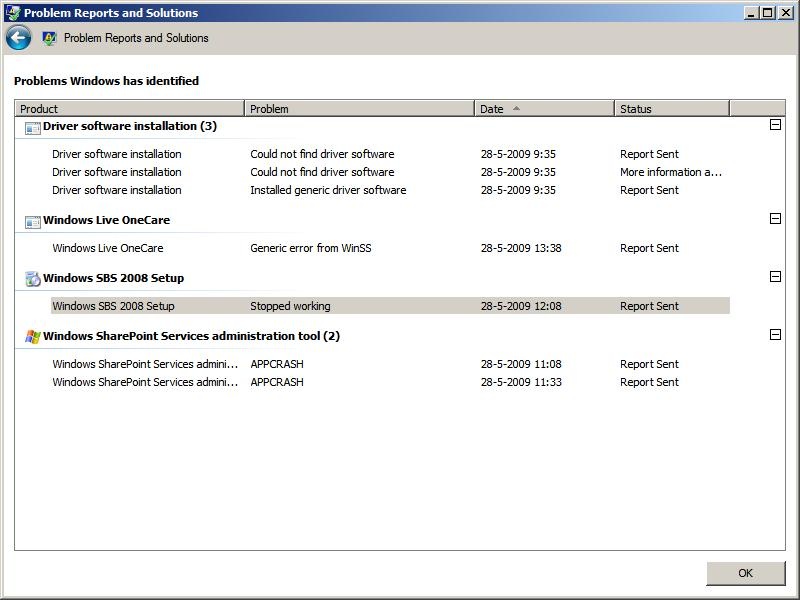
In beide gevallen stopt de installatie voortijdig; eerst stopt de Sharepoint Administration en daarna de SBS 2008 Setup.
Het kan zijn dat dit met het netwerk te maken heeft: ik zit achter een router (Speedtouch modem), met intern IP-adres 10.0.2.x. Met of zonder DHCP aan maakt geen verschil. Tijdens de setup de nieuwste bestanden downloaden of niet maakt geen verschil.
Foutmelding:
Errorlog:
Zoekend op de foutmeldingen vind ik alleen iets over een migratie vanaf SBS 2003, maar daar is geen sprake van. Iemand een idee?
- PC: Asus P5QL-E moederbord, Q9400, 8 GB RAM
- Server: HP ML110 G5, Xeon 2.3 GHz dual core, 8 GB RAM
In beide gevallen stopt de installatie voortijdig; eerst stopt de Sharepoint Administration en daarna de SBS 2008 Setup.
Het kan zijn dat dit met het netwerk te maken heeft: ik zit achter een router (Speedtouch modem), met intern IP-adres 10.0.2.x. Met of zonder DHCP aan maakt geen verschil. Tijdens de setup de nieuwste bestanden downloaden of niet maakt geen verschil.
Foutmelding:
Errorlog:
code:
1
2
3
4
5
6
7
8
9
10
11
12
13
14
15
16
17
18
19
20
21
22
23
24
25
26
27
28
29
30
31
32
33
34
35
36
37
38
39
40
41
| Setup encountered an error: System.Reflection.TargetInvocationException: Exception has been thrown by the target of an invocation. ---> System.Reflection.TargetInvocationException: The TME thread failed (see the inner exception). ---> System.IO.FileLoadException: Could not load file or assembly 'Microsoft.SharePoint, Version=12.0.0.0, Culture=neutral, PublicKeyToken=71e9bce111e9429c' or one of its dependencies. Invalid assembly public key. (Exception from HRESULT: 0x8013141E) File name: 'Microsoft.SharePoint, Version=12.0.0.0, Culture=neutral, PublicKeyToken=71e9bce111e9429c' at Microsoft.WindowsServerSolutions.Common.IWorker.WSSConfig.CWSSOutgoingEmailConfig.ConfigureSharepoint(String primarySmtpServer) at Microsoft.WindowsServerSolutions.IWorker.Tasks.ConfigureWSSOutgoingEmailTask.Run(ITaskDataLink dataLink) at Microsoft.WindowsServerSolutions.TaskManagement.TaskProcessors.NetTaskProcessor.Run(Task currentTask, ITaskDataLink dataLink) at Microsoft.WindowsServerSolutions.TaskManagement.Data.Task.Run(ITaskDataLink dataLink, IDictionary`2 taskProcessorMap) at Microsoft.WindowsServerSolutions.TaskManagement.TaskScheduler.RunTasks(String taskListId, String stateFileName) at Microsoft.WindowsServerSolutions.Setup.SBSSetup.ProgressPagePresenter._RunTasks(Object sender, DoWorkEventArgs e) at System.ComponentModel.BackgroundWorker.WorkerThreadStart(Object argument) WRN: Assembly binding logging is turned OFF. To enable assembly bind failure logging, set the registry value [HKLM\Software\Microsoft\Fusion!EnableLog] (DWORD) to 1. Note: There is some performance penalty associated with assembly bind failure logging. To turn this feature off, remove the registry value [HKLM\Software\Microsoft\Fusion!EnableLog]. --- End of inner exception stack trace --- at Microsoft.WindowsServerSolutions.Setup.SBSSetup.ProgressPagePresenter.TasksCompleted(Object sender, RunWorkerCompletedEventArgs e) --- End of inner exception stack trace --- at System.RuntimeMethodHandle._InvokeMethodFast(Object target, Object[] arguments, SignatureStruct& sig, MethodAttributes methodAttributes, RuntimeTypeHandle typeOwner) at System.RuntimeMethodHandle.InvokeMethodFast(Object target, Object[] arguments, Signature sig, MethodAttributes methodAttributes, RuntimeTypeHandle typeOwner) at System.Reflection.RuntimeMethodInfo.Invoke(Object obj, BindingFlags invokeAttr, Binder binder, Object[] parameters, CultureInfo culture, Boolean skipVisibilityChecks) at System.Delegate.DynamicInvokeImpl(Object[] args) at System.Windows.Forms.Control.InvokeMarshaledCallbackDo(ThreadMethodEntry tme) at System.Windows.Forms.Control.InvokeMarshaledCallbackHelper(Object obj) at System.Threading.ExecutionContext.runTryCode(Object userData) at System.Runtime.CompilerServices.RuntimeHelpers.ExecuteCodeWithGuaranteedCleanup(TryCode code, CleanupCode backoutCode, Object userData) at System.Threading.ExecutionContext.Run(ExecutionContext executionContext, ContextCallback callback, Object state) at System.Windows.Forms.Control.InvokeMarshaledCallback(ThreadMethodEntry tme) at System.Windows.Forms.Control.InvokeMarshaledCallbacks() at System.Windows.Forms.Control.WndProc(Message& m) at System.Windows.Forms.Control.ControlNativeWindow.WndProc(Message& m) at System.Windows.Forms.NativeWindow.DebuggableCallback(IntPtr hWnd, Int32 msg, IntPtr wparam, IntPtr lparam) at System.Windows.Forms.UnsafeNativeMethods.DispatchMessageW(MSG& msg) at System.Windows.Forms.Application.ComponentManager.System.Windows.Forms.UnsafeNativeMethods.IMsoComponentManager.FPushMessageLoop(Int32 dwComponentID, Int32 reason, Int32 pvLoopData) at System.Windows.Forms.Application.ThreadContext.RunMessageLoopInner(Int32 reason, ApplicationContext context) at System.Windows.Forms.Application.ThreadContext.RunMessageLoop(Int32 reason, ApplicationContext context) at Microsoft.WindowsServerSolutions.Common.Wizards.Framework.WizardFrameView.Create() at Microsoft.WindowsServerSolutions.Common.Wizards.Framework.WizardChainEngine.Launch() at Microsoft.WindowsServerSolutions.Setup.SBSSetup.MainClass._LaunchWizard() at Microsoft.WindowsServerSolutions.Setup.SBSSetup.MainClass.RealMain(String[] args) at Microsoft.WindowsServerSolutions.Setup.SBSSetup.MainClass.Main(String[] args) |
Zoekend op de foutmeldingen vind ik alleen iets over een migratie vanaf SBS 2003, maar daar is geen sprake van. Iemand een idee?
Disclaimer: P. aanvaardt geen aansprakelijkheid op grond van dit bericht.